Archive for the 'Zitgist' Category

Exploding the Domain: UMBEL Web Services by Zitgist

Print This Post Print This Post
I am pleased to announce the first phase of the public release of the UMBEL Web Services by Zitgist. This first release consists of a series of user interfaces in-front of several UMBEL web services.

This blog post shows and explains what these web services are about and how people will be able to use them to leverage UMBEL to create new ontologies, to instantiate new data sets and to interlink external ontologies to explode their domains.

Background

For the last four to six months we have been in the process of creating the UMBEL ontology. We have been doing research to find the best basis datasets; we have been cleaning these datasets for UMBEL’s purposes; and we have been developing the ontology and its principles. Starting today, we begin the release process for UMBEL:

  1. UMBEL web services’ user interfaces
  2. UMBEL ontology (OWL-Full)
  3. UMBEL ontology technical documentation
  4. UMBEL subject concepts’ structure (SKOS + OWL-Full) & named entities instantiation
  5. UMBEL web services endpoints.

UMBEL Ontology & Subject Concept Structure

Before starting to show and explain the UMBEL web services’ user interfaces’, I have to give some background information about the UMBEL ontology’s principles, and how the subject concept structure has been created. All this information will be discussed and explained at length in the UMBEL ontology technical documentation that is about to be published; but I have to give some technical background information in order to explain what these web services are about.

As described by Mike, UMBEL’s purposes are:

“[…] to provide a lightweight structure of subject concepts as a reference to what Web content or data “is about”, what is called a concept schema in SKOS […]

Think of the backbone as a set of roadsigns to help find related content. UMBEL is like a map of an interstate highway system, a way of getting from one big place to another. Once in the right vicinity, other maps (or ontologies), more akin to detailed street maps, are then necessary to get to specific locations or street addresses.

By definition, these more fine-grained maps are beyond UMBEL’s scope. But UMBEL can help provide the context for placing such detailed maps in relation to one another and in relation to the Big Picture of what related content is about.

These subject concepts also provide the mapping points for the many, many thousands (indeed, millions) of specific named entities that are the notable instances of these subject concepts. Examples might include the names of specific physicists, cities in a country, or a listing of financial stock exchanges. UMBEL mappings enable us to link a given named entity to the various subject classes of which it is a member.

And, because of relationships amongst subject concepts in the backbone, we can also relate that entity to other related entities and concepts. The UMBEL backbone traces the major pathways through the content graph of the Web. For some visualizations of this subject graph, see So, What Might The Web’s Subject Backbone Look Like?”

A four-article introduction to UMBEL can be read from Mike’s blog at:

UMBEL is a 21 000 subject concept structure that has been derived from the OpenCyc ontology. The structure is described in SKOS and OWL-Full. Each concept is an invididual of the skos:Concept class, which are themselves OWL classes. This dichotomy is the basis of UMBEL. Since the subject concepts are classes, this mean that we can relate these classes to external ontology classes using properties such as rdfs:subClassOf and owl:equivalentClass.

So what does all of this mean? It means that once the linkages between UMBEL subject concepts and external ontologies classes are made, the following becomes possible: 1) the UMBEL subject concept structure can be used to describe (instantiate) things using the UMBEL data structure; 2) external ontology properties can be re-used to describe these new instances since external ontologies classes are linked to UMBEL subject concept classes; and 3) in some cases, the properties defined in these ontologies can be used in relation with UMBEL subject concept classes. The forthcoming technical documentation about this stuff will provide more detailed explanation. For the moment, just accept these assertions as being true.

The UMBEL web services (user interfaces) have been created to help people to manage these relationships between UMBEL subject concepts classes and external ontology classes. People will use the services to infer facts from the structure of the subject concepts, to check if a class is a sub-class, a super-class or an equivalent class of another class. They will also use the services to see what properties, defined in external ontologies, can be re-used, and on which subject concept.

Let the show begin!

UMBEL Web Services Index Page

The entry page lists all the available web services. For each web service, you have a link to the web service user interface, a link to an about page explaining the basis of the web service, and a link to the technical documentation of the web service endpoint: how to communicate with the endpoint web server and how to interpret the answer sent by the web service.

Take note that the web service endpoints are not yet publicly available, and that this endpoint page is provided now for information purposes.

Eleven UMBEL Web Services

  1. Find Subject Concepts
  2. Subject Concept Report
  3. Subject Concept Detailed Report
  4. List Sub-Concepts & Sub-Classes
  5. List Super-Concepts & Super-Classes
  6. List Equivalent External Classes
  7. Verify Sub-Class Relationship
  8. Verify Super-Class Relationship
  9. Verify Equivalent Class Relationship
  10. Subject Concepts Explorer
  11. Yago Ontology — a little help from our friends.

Searching the UMBEL Subject Concept Structure

The first thing people will want to do is to search within the UMBEL subject concept structure. The “Find Subject Concepts” web service helps people to locate potential subject concept they are looking for.

If someone looks at the Find Subject Concepts page and performs a search for the keyword “project”, he will get this list of subject concepts:
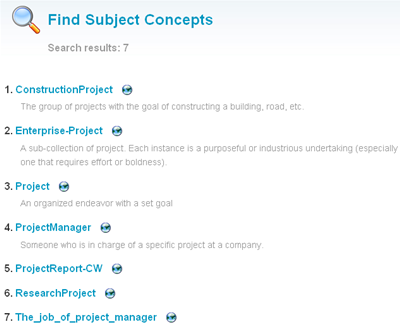
umbel_find.png

Note: all subject concepts are ordered alphabetically and the search has been performed on the subject concept label and their semsets (and not in their definition).

The “finding” web service along with all the inferencing web services use the same result page layout: you have a list of subject concepts with their human readable definition (note: 8000 definitions out of 21 000 have yet to be created). If a user clicks on a result, he will be redirected to the Report and the Detailed Report user interfaces. Additionally, a user can click on the small “earth” icon to start browsing the surrounding subject concepts nodes in the Explorer visualization tool.

Inferencing the UMBEL Subject Concept Structure

A series of web services has been created to infer facts in the UMBEL subject concept structure. There are the two main categories of inferencing web services:

  1. The ones that list subject concepts that are more general, more specific or equivalent to a given subject concept
  2. The ones that answer the question: is this subject concept a sub-concept, a super-concept or an equivalent concept to this other subject concept?

These web services can be used not only to infer these facts on UMBEL subject concepts, but also on external ontology classes. There are a couple of examples of what can be done with these inferencing web services:

Note: some people may notice that the doap:Project external ontology class is a sub-class of the “Project” subject concept. This is not intuitive for humans, but this situation will be explained at length in the UMBEL Ontology Technical Documentation. To make a long story short: considering the nature of the current definition of the doap:Project class, we couldn’t say that it is equivalent to the “Project” UMBEL subject concept.

Visualizing the UMBEL Subject Concept Structure

While inferencing and lookup are good, we still have some issues when we try to “feel” what the UMBEL subject concept structure is. The following two user interfaces will do their best to help people visualizing the subject concepts description and their relations with other subject concepts and external ontologies classes.

Lets start with a wonderful visualization tool, created by Moritz Stefaner, and used by UMBEL to let people visualizing and browsing the data structure.

Lets start by browsing the relationship of the “Project” subject concept:
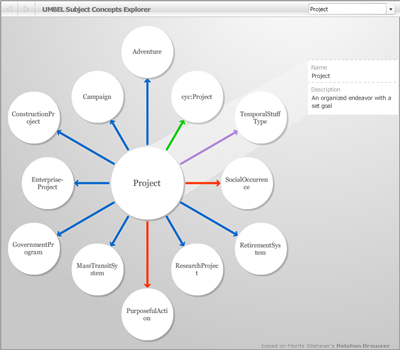
umbel_explorer.png

You can navigate from one node to another by clicking any of the circles. Each circle is an UMBEL subject concept or an external ontology class.

When a node is selected, its concept description is displayed in the right sidebar of the interface.

Note there are four different kinds of relationship between the concepts:

  • Blue (B). (concept A) — broader than –> (Concept B). concept A is more general than concept B
  • Red (N). (concept A) — narrower than –> (Concept B). concept A is more specific than concept B
  • Green (=). (concept A) — equivalent to –> (Concept B). concept A is equivalent to concept B
  • Mauve (I). (concept A) — is a –> (Concept B). concept A is an instance of the concept B

As each node is selected, the display refreshes and shows the new set of relationships for the current node (subject concept or external class). Note the dropdown list shown at the upper right of the display enables you to return to previous views or steps.

The Detailed Subject Concept Report

The detailed subject concept report is the tool to know everything about a specific subject concept. This is not really a web service, but a user interface that uses all existing UMBEL web services to display a detailed report of a subject concept, and all its relations with other UMBEL subject concepts and external ontology classes and properties.

There is the detailed report of the “Project” subject concept:
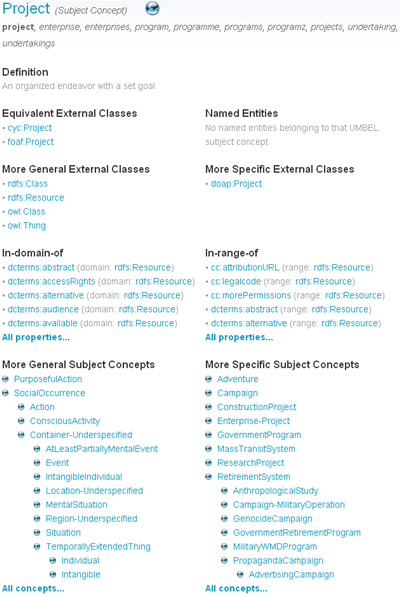
umbel_detailed_repost.png

There is the list of information available from that detailed report page:

  • UMBEL Subject Concept Name — the name of the subject concept
  • Semset — the preferred label and its alternative labels used to refer to this concept. The alternative labels are aliases, synonyms, collocations, etc.; related to the preferred label of the subject concept
  • Definition — the human readable definition of the subject concept
  • Equivalent External Classes — the classes from external ontologies that refer to this same subject concept. Note that the UMBEL Ontology Technical Documentation will explain how the equivalence relation between an external ontology class and an UMBEL subject concept is done
  • Named Entities — a list of named entities related to this UMBEL subject concept. Most of the time, the subject concept has the “type of” characteristic for these named entities. For example, for the subject concept “Person”, “Albert Einstein” is of type “Person”. The first named entities data set that has been used to create this list of named entities is Yago (more about this below).
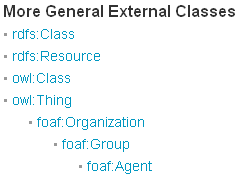
  • More General External Classes — these are the classes from external ontologies that refer to a more general concept. Note that the UMBEL Ontology Technical Documentation will explain how the super-class relation between an external ontology class and an UMBEL subject concept is done
  • More Specific External Classes — these are the classes from external ontologies that refer to a more specific concept. Note that the UMBEL Ontology Technical Documentation will explain how the sub-class relation between an external ontology class and an UMBEL subject concept is done
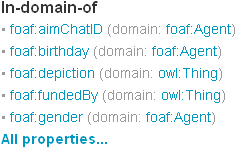
  • In-domain-of — this is a list of properties defined in external ontologies where an individual of the UMBEL subject concept class can be used in the domain of the property. For example, for the subject concept “Person” the in-domain-of property: “foaf:interest (domain: foaf:Person)” means that an individual of the class umbel:Project can re-use the property foaf:interest that is defined in the FOAF ontology in its domain (<umbel:Person> <foaf:internet> <…>). Note that the UMBEL Ontology Technical Documentation will explain how the in-domain-of relation between an external ontology class and an UMBEL subject concept is done
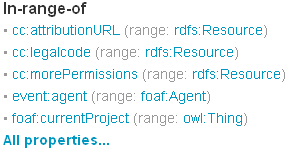
  • In-range-of — this is a list of properties defined in external ontologies where an individual of the UMBEL subject concept class can be used in the range of the property. For example, for the subject concept “Person” the in-range-of property: “doap:developer (range: foaf:Person)” means that an individual of the class umbel:Project can re-use the property doap:developer that is defined in the DOAP ontology in its range (<…> <doap:developer> <umbel:Person>). Note that the UMBEL Ontology Technical Documentation will explain how the in-range-of relation between an external ontology class and an UMBEL subject concept is done
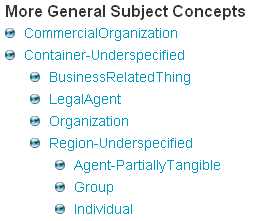
  • More General Subject Concepts — this is the list of more general internal UMBEL subject concepts related to the concept
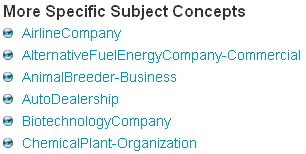
  • More Specific Subject Concepts — this is the list of more specific internal UMBEL subject concepts related to the concept.

As you can notice, all the relations between any UMBEL subject concept to other subject concepts or external ontologies classes and properties is shown in this detailed report page.

This detailed report page was created not only to show people what UMBEL subject concepts are. I envision that people (more specifically ontologies developer & ontologies users) will also use it to check the current linkage between UMBEL and external ontologies and how to use UMBEL to instantiate and describe resources in RDF, etc. The UMBEL ontology documentation will describe some linkage and re-using use cases in further detail.

Linked External Ontologies and Named Entities

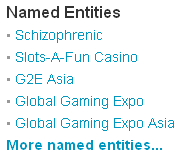
Lets take a deeper look at the named entities section of the detailed report of the “Person” subject concept:
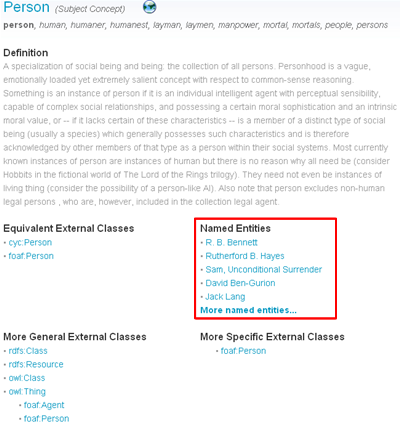
umbel_named_entities.png

These named entities are individuals belonging to the class umbel:Person. If you click on one of these person names, you will notice that they are described the Yago data set. How is this possible?

To make another long story short: umbel:Person is an equivalent class to the cyc:Person class; cyc:Person is an equivalent class to the wordnet:Person class; yago:R._B._Bennett is an individual belonging to the same wordnet:Person class. So we can infer that yago:R._B._Bennett is an individual also belonging to the umbel:Person class. However, these technical details will be explained at length in the UMBEL ontology documentation.

But the truth is that this is not the most wonderful thing around. The most wonderful thing is when we understand what that really means (the linkage between yago:R._B._Bennett and umbel:Person (or any other data sets linked to UMBEL)). This means that this linkage is literally exploding the domain of each of these linked named entities. In fact, now we know this about yago:R._B._Bennett:

  • It is an umbel:Person
  • It is a cyc:Person
  • It is a foaf:Person & a foaf:Agent
  • It is a umbel:HomoSapiens
  • It is a umbel:SocialBeing
  • That we can re-use the foaf:birthday, foaf:name, doap:translator, dcterms:creator, etc.; external ontologies properties to describe this person.

We can infer all these things, and much more, about yago:R._B._Bennett only by linking it to UMBEL. We just contextualized it; and then we exploded its domain!

This is what UMBEL is about; this is the value it creates; and its contribution to the Semantic Web.

Conclusion

This is just the beginning of UMBEL. Currently ten external ontologies have been linked to UMBEL. The attentive eye will notice some strange results in the in-domain-of and in-range-of detailed report sections. More work has to be put in the linkage; however as you will notice in the technical documentation of UMBEL, some weird results come from the way some ontologies are defined. So, these ontologies self-definition create some of these weird results. So this mean that these UMBEL tools won’t only help by linking external ontologies, but they will also help to define new ontologies and to fix existing ones.

Stay tuned; more stuff will be released in the coming weeks and months.

Zitgist Got its Orchestrator

Print This Post Print This Post

I am pleased to finally be able to say that Mike Bergman is the new Chief Executive Officer of Zitgist LLC. After months of discussions, hard work, planning and development, Mike became officially the new CEO and Zitgist made a giant leap ahead.

The first contact

The first time I started to collaborate with Mike was related to the UMBEL project. Mike had an idea and I wanted to help him to make it real. At that time I didn’t know that my participation in UMBEL and my collaboration with Mike would impact Zitgist forever.

Months later I released a new prototype project called zLinks. This project has been the tipping point of my collaboration with Mike. However, even at that time, I didn’t know how these two projects would change Zitgist forever.

Those first months were a warm-up session for Mike and me. Everything started from there; we were ready to work together.

Working together

Since that time we have worked together to forge Zitgist, to shape it to Kingsley’s, Mike’s and my vision. The process hasn’t always been easy. Each day brings its challenges, opportunities and work. We spent months to talk about Zitgist’s vision, voice, goals and direction.

Considering Zitgist’s business, people could think that everything was related to technologies, high-tech research and development. But today I would say that those things are nearly secondary. It is sure that activities, services and products are at the center of our discussions; however, we found that the center of everything was: communication.

Communication

Mike lives in Iowa, Kingsley in Boston, me in Quebec City. The three of us have different cultures, different native languages, and live in different places.

On the other hand, Zitgist is a company that gives services and creates products to help people and businesses interlink their data: to make real the value of the global data assets. We try to make data easier to communicate, publish and share.

We belong to the semantic web community. We talk and collaborate with people from around the World: with different cultures and languages. We talk about a domain (the semantic web) that is not yet fully defined and that is still highly academic. We are still juggling with concepts and terminology that we try to share with the community and people from outside this community.

Given that, all challenges can be captured in one word: communication.

We have to communicate our ideas and vision; we have to sell our services and products; we have to make data richer and easier to use and understand; we have to create a vision, a voice and a language. So yes, this is all about communication. But even more: it is all about human communication; communicating to people and companies in different languages with different cultures.

We understand one aspect of the semantic web vision as machines talking to machines. But Zitgist’s challenge is to talk with people.

Mike is now the new orchestrator of Zitgist; it is time for us to communicate our voice to the World.

A new Zitgist

This process forged Zitgist. All the discussions we had, all the ideas we challenged and all the ways we experimented to speak with the outside World forged Zitgist’s vision and voice. The time we put into making Mike the new CEO completely changed Zitgist’s dynamic. We were not just talking about hiring someone; we were talking about growing up a business and achieving a shared vision and voice. Once more, it was about communicating ideas, concepts and vision.

It is all about communication.

Thanks for joining us, Mike.

More references about this news

The official press release
Mike’s personal perspective

Zitgist DataViewer

Print This Post Print This Post

Zitgist is releasing a totally new semantic Web data viewer: the Zitgist DataViewer (on test servers). This new Web service pushes even further the semantic Web data visualization principles initiated with the Zitgist Browser.

The goal of the Zitgist DataViewer visualization tool is to provide a user interface that morphs semantic Web data into a form that can be easily read and understood by humans. The Zitgist DataViewer moves this vision forward in three ways by:

  1. Adding features to help users manage the overload of information published from some data sources,
  2. Speeding up the data visualization process and giving more feedback to users when data sources are being analyzed and documents constructed, and
  3. Changing the templating system to make them cope with a wider range of type entities even if these types are unknown by the system.

In this blog post I will show you all the new features of the Zitgist DataViewer, how it can be used, and how each feature enhances the experience of users.

Main Entity Display Sections

On the semantic Web, everything is a “resource”. A resource can be seen as an Entity, or sometimes also called a Thing. This thing can be a person, an album, a place in the World, etc. Each entity is described by its properties: the age of a person, the name of an album, the population of a city, etc.

The Zitgist DataViewer reads all the information available for these entities, and displays it to the user as best as it can so that users can easily read and understand information about these various entities.

The first step performed by the Zitgist DataViewer is to get information about that entity and to create the Web page that will be presented to users. Figure 1 is the progress bar showing the status of the Web page creation process to the user.

page_load_progress_bar2.png

Figure 1

As you can see in Figure 2, each entity is represented in a table. Within each table, information available about entities is displayed to users. Figure 2 represents information available about a person called Ivan Herman.


general_resource.png

Figure 2
These are the six main section of a table representing an entity:

  1. Tab. This tab displays the type of the entity. In this case, Ivan is a Person. If the table is collapsed (see section about tools), the name of the entity will be displayed in the tab instead of the type.
  2. General information. This section displays general information about an entity. In this example, since the entity is a person, the name of that person, his contact information, his location and a photo of the person are displayed in the “general information section”.
  3. Tools. These tools are used to perform action on an entity table.
  4. See-more. This section aggregates all the same properties describing a person. By clicking on the “see-more” button, the complete list of properties will be displayed to the user. This feature gives an additional means for users to manage information overload.
  5. References. This section lists all other entities referring to the viewed entity. For example, in this case the references are each entity that “knows” Ivan, such as friends, co-workers, etc.
  6. Information sources. This section displays clickable links to the locations of all Web sites that contributed the actual information displayed in the DataViewer.

Note – depending on the specific type of Entity at hand – there are multiple display formats or “templates” (see below) that structure the content and format of the actual data presentation within the DataViewer.

The General Information Section

contact_information_section.png

Figure 3

This section displays all general information about an entity. General information is typically the information a human would think best describes a particular type of entity. For example, typical information about a person would be name, contact information, location, birthdate, occupation, photo, etc.

Tools

resources_tools.png

Figure 4

These tools shown in the red box are used to perform some actions on the entity table. From the left, the icons do the following:

  • mini-Z icon. This displays information available from zLinks about the entity.
  • Lookup icon. This shifts the focus of the DataViewer to this particular entity. In some cases you may have more than one entity per URI, or you may want to focus your navigation on an embedded entity, and this tool allows you to only see the currently active entity.
  • Up arrow icon. This scrolls the DataViewer up to the page from any entity table.
  • Close icon. This collapses any entity table. By clicking on this icon, only the tab becomes apparent.

See-more

This feature is used to aggregate and hide all same properties. As shown in Figure 5, if the user clicks on the blue button that says that there are 70 more “Knows” properties, then all known properties will be displayed to the user.

seemore.png

Figure 5


On the other hand, if the user check clicks on the “Hide objects” button, this expanded display is then collapsed with the section hidden again.


Inline Embedding

With the Zitgist Dataviewer, users have the possibility to embed entities on-the-spot. This means that they don’t have to open a link in another page; they can do it by embedding it in the current page.

If the user moves his mouse over a link within an entity table, he will see a blue right-arrow appearing. If the user clicks on the normal link (using the example of Uldis Bojars in Figure 6), then the entity Uldis Bojars will be opened in a new page.

On the other hand, if the user clicks on the blue right-array, the Uldis Bojars entity will be embedded on-the-spot.

inline_embed_1.png

Figure 6

If the user click on the arrow, a progress bar will shows the processing, by the server, of the creation of the Uldis Bojars entity.


inline_embed_2.png

Figure 7


This action results in the entity Uldis Bojars being embedded in the current DataViewer page as shown in Figure 8.


inline_embed_3.png

Figure 8


References

On the semantic Web, entities are more often then not referring to other entities. Such a situation arises when I describe the fact that I know another person. So, an entity (me) knows another entity (say, Bob).

The references section of the Zitgist DataViewer thus shows the user what other entities refer to the current one being displayed.

In the Figure 9 we expand the references of the Ivan Herman entity. We now see the entities, known by the Zitgist DataViewer, that refer to the Ivan Herman entity. One reference we see is to Yves Raimond:


references.png

Figure9


Information Sources

On the semantic Web, everybody can describe anything about everything. This means that I can describe things about a person entity, or an album entity, or about virtually anything.

The only thing I have to do is to publish that information on the Web so that people can access it and do whatever they want with the information once published.

The information sources section of the Zitgist DataViewer is used to tell users where the information they are looking at comes from on the Web. So this section displays a link to all the Web pages where we got information about an entity that we display in the DataViewer.

This way, users can check the provenance (so accuracy and trust) of the information they are viewing.

information_sources.png

Figure 10


Paging Tool

In some cases, there may be more than one resource to display to the user for a given data source. If there are more than five resources to display, results are paged. This is another feature to help the user to manage the overflow of information.

paging.png

Figure 11


Since the pages are created asynchronously (using AJAX techniques), people also copy the link from their Web browser to send to others. To do so, the user simply clicks on the “link to this page” icon and then copies the URL.


Sidebar Tools

Another feature to manage information overload is the addition of sidebar tools:


open_nav_sel_panels.png

Figure 12


The user can click on the first tab to display the “Navigator Sidebar Tool” or on the second tab to display the “Selector Sidebar Tool”. Then he can re-click on these tabs to close and hide the sidebar.


Navigator Sidebar Tool

This tool (Figure 13) provides an overview of the entities available for a given data source. All entities are aggregated in the same section of the tool depending on their type (all persons together, all documents together, etc.). By clicking on one of these items the user is redirected to the table displaying information about the entity.

navigator.png

Figure 13


Selector Sidebar Tool

The Selector Sidebar Tool (Figure 14) is used to show and hide entities and properties to the user. By using this tool a user can hide things he doesn’t want to see:

selector.png

Figure 14


This tool can be really useful with some scenarios. For example, if a user only wants specific information from a given data source; then he only has to click on the “Hide all” button to hide all properties and then to click on the property he wants to see. This way, only the desired information will be displayed. In essence, the Selector works as a filtering or faceting mechanism.


The Templating System

The Zitgist DataViewer uses a templating system to organize the data available for a given entity. Depending on the type of an entity (is it a person? a music album? a document? a geographical place? etc.) the viewer will manage and organize the information available for an entity differently.

Each template tries to organize the information such that it is optimized for human reading and understanding.

By example, each template defines which information to put in the General Information section of each entity. It determines how to format and organize that information, how to handle specific things such as images, how to insert certain widgets such as maps and grids, and how to optimize the presentation of other kinds of information.

The only goal of the templates is to make information for each viewed entity more readable, so understandable, by humans.

The DataViewer’s new templating system also manages some properties even if a template is not defined, resulting in a hierarchy of templates composed of sub-templates inherited from upper templates.

This means that even if the Zitgist DataViewer doesn’t know how to organize information of a certain type of entity (because the viewer may not have a template for that type), it can organize other parts of the information based on existing templates and the behaviors of certain special properties.

Currently Supported Templates

There is the list of templates currently supported by the Zitgist DataViewer:

  • Music Ontology templates:
    • mo:Release
    • mo:SoloMusicArtist
    • mo:Track
    • mo:MusicManifestation
    • mo:MusicArtist
    • mo:MusicGroup

Screenshots:

moalbum.png

motrack.png

  • Description Of A Project Ontology templates:
    • doap:Project
    • doap:Repository
    • doap:Version

Screenshot:

doap.png

  • Friend Of A Friend Ontology templates:
    • foaf:Agent
    • foaf:Document
    • foaf:Group
    • foaf:Image
    • foaf:OnlineAccount
    • foaf:Person

Screenshot:

foaf.png

  • Geonames Ontology templates:
    • geonames:Feature

Screenshot:

geonames.png

  • Semantically-Interlinked Online Communities Ontology templates:
    • sioc:User
    • sioc:Container
    • sioc:Forum
    • sioc:Item
    • sioc:Post
    • sioc:Site
    • sioc:Space
    • sioc:Usergroup

Other Ontologies also result in the addition of still more templates, for example: wgs84:Point, wps84:SpatialThing, bibo:Document, rss:Channel, rss:Image, rss:Item, frbr:Endeavour, frbr:Manifestation, rdf:Bag, rdf:Seq, owl:Thing.

One more screenshot (RSS):

rss.png

The Skinning System

While the templates organize the structure and scope of information about entities, skins manage the appearance of that organized information. The Skinning System for the DataViewer governs which colors to use, which images to use, which dimensions to use, where to place on the screen, and what to show.

There are currently two skins created for the Zitgist DataViewer. The default skin is the standard appearance of the DataViewer within your Web browser. The second skin – called the mini-Dataviewer – is used to optimize the display of the DataViewer within a restricted area, such as a small container on a Web page or a mobile device such as the iPhone.

Figures 15 and 16 show two entities viewed with this mini-DataViewer interface on an iPhone. As you can see, the information is not displayed the same way, and the user interface and colors have changed to optimize for a small mobile device.

minidv_1.png

Figure 15


minidv_2.png

Figure 6


zLinks within the DataViewer

From earlier posts, recall:

“The zLinks client-side service is an entry point to a vast new world of additional rich data and link-related services […] zLinks automatically ‘turbocharges’ all of your existing and new content links to tap these resources that are contextual, relevant, informative and actionable.”

The zLinks Web service has now been integrated within the Zitgist DataViewer.

Users now have access to related stuff about every linked entity displayed in the DataViewer. These zLinks provide not only related information about an entity, but also what that entity is about and what also refers to it.

In the Figure 17 we use the zLinks Web service to take a look at the publications (in this example, the talks) linked from the entity Ivan Herman. The service lists all talks by Ivan, as well as provides links to his personal profiles and to the profiles of his friends.

zlinks_within_dataviewer.png

Figure 17


Dataviewing examples

There are a couple of visualization of URIs using the Zitgist DataViewer.

The default DataViewer user interface:

The mini-DataViewer user interface (you will be redirected to an iPhone testing website):

Conclusion

The Zitgist DataViewer is the next step to make semantic Web data more accessible and usable. It is an important upgrade over its earlier version, what had been known as the Zitgist Browser.

We are now learning how to move beyond the “triple” and how to better visualize semantic Web (RDF) information published on the Web. Many new features in the DataViewer help users to manage information overload. Others provide feedback or access to still further useful information. Performance and display speeds have been improved. Organization and a templating system add further flexibility.

We believe the usability of the DataViewer has been greatly enhanced. Still, we are not satisfied. We welcome your feedback and will continue to seek improvements for the next round of enhancements. Zitgist is committed to data usability and ease of access. We welcome your participation as we continue on this quest!

Turbocharge your Links with zLinks

Print This Post Print This Post
zlinks_logo_175.gif zLinks will turbocharge the links on your web pages. It will unveil the power of the connections you make.

The story goes like this:

The essence of the Web is the link. We use it to navigate, discover, form communities and get rankings on search engines. But, each link carries much more behind it than what has generally been exposed.

zLinks is a client-side service provided as a simple plug-in to turbocharge your links. All links embedded in a blog post or its comments, or from within a content management system (CMS), gain immense power to link to and display additional related data and information. zLinks thus becomes a jumping off point for additional exploration and learning.

Site authors merely install the free zLinks service plug-in and their users and readers gain the benefits thereafter.

A New Service and Wordpress Plug-in

Three weeks ago I introduced the Zitgist Browser Linker. From the basis of this prototype we now have: created a new brand called zLinks; enhanced the underlying web service that powers it; and greatly enhanced the initial Wordpress plug-in.

zlinks_main.png

Some Basics

We should remember what zLinks does:

  1. To visit Web pages and locations
  2. To potentially take actions (say, buy or search), and
  3. To retrieve data resources.

It is that simple.

So, what is really new with the new and improved zLinks, other than a cleaner and more usable user interface with its new icons, details, scroll bar and better linked resources results?

Annotations

With zLinks, we wanted to take a first step toward editing and publishing stuff on the Semantic Web. We wanted to let people annotate their embedded URLs with some thoughts, some remarks, etc.

Remember that I said, in my previous blog post about zLinks, that each URL is in fact a URI, potentially an identifier for a resource.

So, with the zLinks Wordpress plug-in, people now have an easy-to-use tool to annotate resources from within their blog posts.

zlinks_annotations.png

In two clicks one can say anything about any resource he links to from his blog post. Simple? Yeah it is (at least I hope it is).

Annotating resources is simple, however when we start thinking about what is going on under-the-hood, when we start thinking about the architecture used to publish this data and make it available on the Semantic Web, things start to get more complex (and, more fun ☺ ).

Publication Architecture behind zLinks Annotations

First of all, zLinks archives all annotations on the local instance that is running Wordpress (in the case of the Wordpress plug-in). Then, if the author chooses to share his annotations, then they can be made available in RDF, with dereferencable URIs, in multiple forms, using the Annotea ontology.

URIs Generated

Three kind of URIs are generated by zLinks:

  • URI for the resource representing the author (note that this can change with preferences, more on this below)
  • URI for the list of all annotations from a blog (will only list the annotations that are shared)
  • URI for a single annotation

These generated documents are then used to publish the information to anyone who wants it.

Why Are the URIs Still Ugly?

The goal is make the installation of the plug-in as simple as possible and to make sure it is compatible with any Wordpress installation. Since I didn’t want people to have to mess with the configuration file of their web server or to create URL-rewrite rules such as the ones on the Apache server, we left the ugly URIs as is.

(But, stay tuned, everyone always prefers a pretty URI!)

Consuming Annotations Data

The first service that consumes the zLinks annotations data is Ping the Semantic Web. So, each time a new annotation is created or updated (and assuming that the author has chosen to share his annotations), zLinks will send a ping to PTSW so that still other services can be notified of this creation or updating.

The zLinks web service (which is what sends the links to the zLinks Wordpress plug-in) communicates with PTSW to get the latest created and updated annotations. Once zLinks gets this list of annotations, it then indexes them in the Zitgist Linked Data Store.

Then, once indexed by the system, the annotations are processed by zLinks and further aggregated with other resources for other zLinks. So, if I annotate a URI A and if another author puts a zLink for this same URI A, then he will see my annotation, on his blog, for this specific embedded link.

More than Annotating a Web Page

This goes way beyond merely annotating a URL. In fact, I can annotate a URI referring to a resource describing a person. That way, I can say something about a person directly from my blog. So, I can annotate (say something) about a place I link to, about a person, about a book, about a music album… Amen!

(By the way, see the orange underline with those zLinks “mini-Z” icons? That means the link is annotated. Mouse over one of the icons to pull up the zLinks popup and its annotation. You can then see what I mean about the power of these annotations. And, yeah, there is also much else hiding behind the different icon types and backlinks you see in these popups! Go ahead, explore . . . )

zlinks_environment.jpg

The most beautiful part of the story is that the author only has to annotate a link using the zLinks easy-to-use interface, and all the other magic is done automatically, without any human interaction.

Links are made by themselves, data is published by the user’s publishing software (Wordpress), the data is broadcasted (multiplexed) to web services and user agents using PTSW, and the data is re-used by zLinks via ZLDS. Wow!

All in 2 user clicks! Can you say Cool?

How to Annotate a URL

As a blog author, if you are logged into your Wordpress instance, you will see two icons instead of one when you are viewing the blog post you wrote.

(Note, only you as the author see these two icons; standard visitors do not.)

zlinks_icons1.png

You only have to click on the first of the two icons to see the annotation window appearing beside the link. Then you fill in the annotation writing box and click the “Save” button.

That is it; it is that simple.

Configuration of zLinks

To gain this sharing power, the blog owner must do a simple configure of his zLinks plug-in. First, he has to determine if he wants to share his annotations with the World (the “public” option with notifications via PTSW, what I explained above), or if he wants to restrict his annotations as “private” so that only his blog readers can read them.

The other thing a user has to configure is the identifier he will use as the reference to himself as the annotations author.

There are three choices:

  1. The author doesn’t have an existing ID, and wants to use the default one provided by zLinks. With this option, zLinks assigns a simple numerical identifier generated by Wordpress,
  2. The author does have an existing ID (URI) and wants to use that as identifier. That way, his personal URI (usually the one he uses to refer to himself on the semantic web, such as his FOAF profile URI or OpenID), will be to one that links him as the author of his annotations, or
  3. The author starts by using the default URI by zLinks (#1), but later wants to create a better personal URI (#2). In this case zLinks will create a special owl:sameAs link between the default profile and the new one so that once the personal URI is created all prior annotations get the good treatment too.

These simple things are the only ones a blog author has to configure to make the zLinks plug-in work as he would like. Much more information about these configuration options and other topics is available in the FAQ.

Must Read!

The best introduction you can read is from the home page of zLinks.

The best way to see how zLinks is working in its smallest detail is by reading the extensive FAQ. (Actually, even better is to install it!)

Some Use Case Examples

Download

You can download from here and install zLinks in your Wordpress software.

Conclusion

So, turbocharge your links on your blog to show the power of their connectivity to your blog readers.

This is an example of how semantic web technologies and concepts can be leveraged to add value to web services and to enhance users experience.

(By the way, I’d like to thank Mike Bergman for letting us use some of his text from his earlier blog review; and for revising this blog post grammar :) )

Blogs, Wordpress, Zitgist and the Semantic Web

Print This Post Print This Post
rdf-zitgist-wordpress.png Every link has a relation on the Semantic Web. Each time a person create a link from a web page to another web page, it does much more than simply linking… In fact, the Web and the Semantic Web are starting to mesh together.

The meshing is occurring at the level of the URI, or more specifically at the level of the URL if we are talking about the Web. This is what I will show you in this post using a Wordpress plug-in I developed using Zitgist technologies.

Motivations driving the development of the plug-in

The first objective of this project is to try to find out how people could integrate semantic web concepts and principles in the systems they daily use. How can we integrate the semantic web into Blogs for example? Is the use of semantic web technologies only good at publishing content in RDF? This is certainly one thing, but I doubt it is the only one. This is for that reason why I put some time in developing this prototype.

The second motivation is to create a good prototype of a system using Zitgist’s architecture to show people how they can take advantage of Zitgist to develop their projects; to make their vision a reality.

Some background thinking about the plug-in

On the Web, people mainly manipulate web page resources. They locate them on the Web using a unique locator, called a URL. On the semantic web on the other hand, people do not only manipulate documents; they manipulate many kind of Things, many kind of resources. They refer to them using URIs. The difference between a URI and a URL is that a URL is resolvable on the Web, but not necessarily a URI (in fact, a URI is the super-class of a URL). However, best practices suggest people to make URI resolvable (dereferencable) on the Web; in such a case a URI is a URL.

Anyway, all this to say that a URI in the semantic web can be a URL on the Web. There are many use cases emerging from that special digital environment. As an example, many people will use a Wikipedia Wiki Page URL as an URI for a topic, an interest, or for many other relations to these concepts. In such a case, the URL of a webpage is used to refer as a Concept. I don’t want to discuss about the basis of this, but it is a fact, and we have to handle it.

Introduction to the Zitgist Wordpress Plug-in

This plug-in is quite simple in appearance, but has some really interesting results for users.

The only thing this plug-in does, is to show blog readers existing related data for a given URL and, in some case, to enable them to perform actions based on this data.

By example, if I make a link to Tim Berners-Lee’s web page, a user could be interesting in having more information about Tim, directly from the article he is reading. Tim has many data related to him from the semantic web.

timbl.png

That is it. The plug-in display related information to links from a blog post. In this case, it is people Tim knows and Tim’s profile. The information is shown the users using a contextual menu. The data is requested to Zitgist’s systems and is displayed to the user. This is that simple, but how powerful?

The usefulness of the Zitgist Wordpress Plug-in

The plug-in is quite useful in many ways. In fact, it instantly displays related information about a link to readers of the blog. From any blog post, a reader can easily jump to resources related to each link.

Some use cases

Above I said that a URL, a web link, could be much more than it usually appears. So bellow, I show a couple of use cases showing the potential behind the idea.

1. URL as a web page

What happen when a link from a blog post is a URL? Well, some things can happen, and there is an example:

Check it by yourself: The Bibliographic Ontology

bibo.png

Here a user can check the webpage directly, or he can jump to related resources. These related resources come from the semantic web. The first one is the description of the project. The following two are the authors of the ontology. The last resources are documents related to the ontology and the “version” of the ontology.

2. URL as a dereferencable URI

For the non-initiated readers, I would suggest you to read this best practice tutorial explaining how to publish semantic web data on the web.

Sometimes (okay, not that much at the moment, but I hope people will start), people link to resource URIs (so, URL that can be dereferenced to get RDF dat